Cloudflare Search for Agents: Expose /.well-known/search With One Toggle
How Cloudflare's new Search for Agents works, including auto-discovery metadata, HTTP QUERY (RFC 10008), Workers Free limits, and December 1 billing.
Q. What changes on my website when I turn on Cloudflare Search for Agents? With a single toggle under Quick Actions in the Cloudflare dashboard, Cloudflare crawls and indexes your site automatically and exposes a
/.well-known/searchendpoint on your own domain. Instead of scraping pages one by one, AI agents can auto-discover the endpoint and retrieve relevant Markdown excerpts directly.
⚠️ Accuracy guardrail: This guide is based on Cloudflare's official blog announcement (published November 25, 2026) and the AI Search developer documentation (marked Beta, including Limits & pricing) as of November 26, 2026. Search for Agents is currently in beta across all plans, and AI Search billing is scheduled to begin on December 1, 2026, so quotas and rates may change. We verified the defaults and specs directly from official documentation rather than toggling the setting on a live Toris Studio zone.
30-second summary
- One-click agent search: Turning on Search for Agents in your domain's Overview > Quick Actions creates a
search-for-agents-<ZONE_ID>instance and openshttps://yourdomain.com/.well-known/search. - Auto-discovery metadata: Cloudflare injects
agent:*meta tags into HTML<head>responses and YAML front matter when Markdown for Agents is also enabled. - Retrieved Markdown, not generated answers: The endpoint runs hybrid (vector + keyword) search and returns matching Markdown chunks with relevance scores instead of an LLM-generated summary.
- Supports both GET and HTTP QUERY (RFC 10008): Agents can query via
?q=...or send plain-text and JSON payloads using the standardized HTTPQUERYmethod. - Included free tier on all plans: Available even on Workers Free (capped at 500 crawled pages per day), with overage billing under AI Search pricing starting December 1, 2026.
What Search for Agents solves: domain-level search instead of blind crawling
Search for Agents lets AI agents query your site's index directly through a domain-level endpoint instead of crawling every individual page. Previously, wiring up Cloudflare AI Search for a website required manually creating an instance, connecting a website data source, exposing endpoints, and documenting where agents should look. This update puts that entire setup behind one dashboard toggle.
While Cloudflare's Markdown for Agents converts individual pages into Markdown on demand, Search for Agents complements it by pre-indexing your zone and returning ranked Markdown chunks from one endpoint. As agent workflows standardize around protocols like Google Workspace MCP and Claude's MCP extensions, exposing site search over plain HTTP without running your own MCP server is a practical win for solo developers.
Q. Does the search endpoint generate an AI answer? No.
/.well-known/searchreturns retrieved Markdown content, source paths, and scores—never a generated answer. Since the calling agent already has its own model and conversation context, Cloudflare avoids adding redundant generation latency or hallucination risk.
How it works and auto-discovery metadata
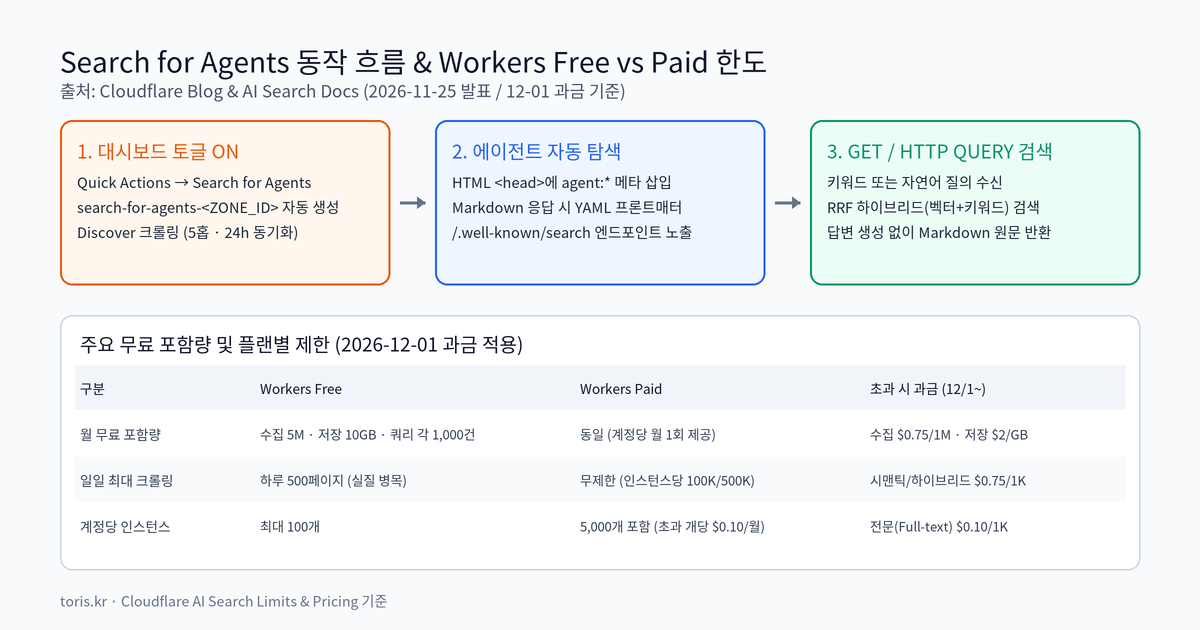
Once enabled, Cloudflare creates an AI Search instance named search-for-agents-<ZONE_ID> in the default namespace using https://<YOUR_DOMAIN> as its website data source. It uses the discover parse type to follow both sitemaps and internal links up to five hops deep, syncing every 24 hours without requiring a sitemap.
To help agents discover the endpoint automatically, Cloudflare inserts four meta tags into the <head> of HTML responses:
<meta name="agent:instructions" content="Use this search API to find relevant content across this site with keywords or natural-language queries, instead of crawling individual pages. Results are returned in Markdown." />
<meta name="agent:endpoint" content="https://example.com/.well-known/search?q={query}" />
<meta name="agent:method" content="GET" />
<meta name="agent:documentation" content="https://developers.cloudflare.com/ai-search/how-to/search-for-agents/" />
If Markdown for Agents is also active and an agent sends Accept: text/markdown, the same fields appear in YAML front matter at the top of the Markdown response. Requests to /.well-known/search remain subject to your Bot Management, AI Crawl Control, and WAF rules.
Default settings and HTTP QUERY (RFC 10008) support
The embedding model (@cf/qwen/qwen3-embedding-0.6b) and data source are fixed when the instance is created, while retrieval and caching options can be tuned later in the AI Search dashboard. The documented defaults are as follows:
| Setting | Default | Notes |
|---|---|---|
| Parse type | discover (sitemaps + links) |
Max depth 5 hops · subdomains off |
| Crawl page limit | 100,000 pages (subject to plan limits) | 24h sync interval · 24h crawl cache |
| Search & embedding | Hybrid (vector + keyword) · RRF fusion | @cf/qwen/qwen3-embedding-0.6b |
| Chunking | 1,024 tokens · 10% overlap | Max 10 chunks · match threshold 0.4 |
| Reranking & query rewrite | Off by default |
Similarity cache On (Strong · 48h) |
Clients can query the endpoint with standard GET requests or the HTTP QUERY method (standardized as RFC 10008 in June 2026). Using QUERY lets agents send longer natural-language questions or JSON payloads in the request body safely and idempotently.
# 1. GET request
curl --get "https://example.com/.well-known/search"   --data-urlencode "q=How do I verify webhook signatures?"

# 2. HTTP QUERY request (JSON)
curl -X QUERY "https://example.com/.well-known/search"   --header "Content-Type: application/json"   --data '{"q":"How many bulk import requests per minute does Email Service allow?"}'
Workers Free vs Paid limits and December 1 billing
Search for Agents works on every plan, including Workers Free, but you should check both plan limits and the AI Search billing schedule taking effect on December 1, 2026. On Workers Free, the binding bottleneck is the 500-page daily crawl limit—larger sites with thousands of pages will not finish indexing in a single day on the free tier.
| Item | Workers Free | Workers Paid | Overage rate (from 2026-12-01) |
|---|---|---|---|
| Monthly included usage | 5M ingestion tokens · 10 GB-mo storage · 1,000 semantic · 1,000 full-text | Same (once per account per month) | — |
| Max pages crawled per day | 500 pages/day (binding limit) | Unlimited (up to 100K/500K per instance) | — |
| Ingestion | Within 5M free tokens | Within 5M free tokens | $0.75 / 1M tokens (OCR +$0.50/1M) |
| Storage | Within 10 GB-month | Within 10 GB-month | $2.00 / GB-month |
| Search queries | 1,000 semantic · 1,000 full-text | 1,000 semantic · 1,000 full-text | Semantic/hybrid $0.75/1K · Full-text $0.10/1K |
Because /.well-known/search is a public endpoint, unthrottled bot traffic could burn through the 1,000 free monthly semantic queries quickly once billing starts. Keeping the 48-hour similarity cache enabled and pairing it with AI Crawl Control or WAF rate limiting is strongly recommended.

Toris's take
If you host a personal tech blog or open-source documentation on Cloudflare, turning this on is an easy win. You give AI agents accurate, up-to-date retrieval without maintaining a vector database or RAG backend, and sites with a few hundred pages fit comfortably inside Workers Free's 500-page daily crawl and monthly free allowances.
On the other hand, sites with thousands of pages or heavy bot traffic should check two things before flipping the switch: exclude any private or noisy paths via AI Search path filtering first, and set up WAF rate limiting ahead of December 1 so automated callers cannot run up unexpected query charges.
Sources
Advertisement